Standalone Apple Watch app
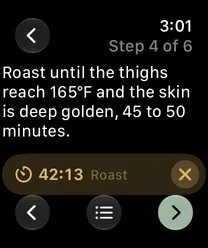
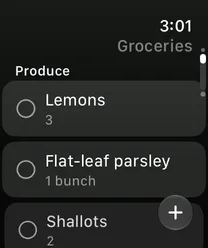
Apple Watch syncs with your Savorum library on its own. Check off groceries sorted by aisle, view today’s planned meals, start cooking from your wrist, track timers across multiple dishes, and add watch face complications.
Savorum is a native app for iPhone, iPad, and Apple Watch that connects to Savorum Cloud or your own self-hosted Savorum Core server with no extra subscription for self-hosters.
Free to download on the App Store. Requires iOS 26 or later and watchOS 26 or later. Runs in any modern web browser on Mac, Windows, Linux, and Android.

Apple Watch syncs with your Savorum library on its own. Check off groceries sorted by aisle, view today’s planned meals, start cooking from your wrist, track timers across multiple dishes, and add watch face complications.
Photograph printed cookbook pages, magazine clippings, or handwritten cards in Imports → Scan Recipe. Apple’s on-device text recognition extracts ingredients and instructions so you can review measurements before saving.
While cooking on iPhone or iPad, ask aloud for the next step, a timer, or a scaled ingredient amount. Speech recognition runs on the device in the app’s language and answers for your current batch.
Cooking timers appear as Live Activities on the Lock Screen and in the Dynamic Island, with system alarms when permission is granted. Cook several dishes at once, each at its own step and batch size.
Add interactive Grocery List, Today’s Meals, and Meal Plan widgets to the Home Screen on iPhone and iPad. Save web and social recipes from Safari or other apps using Share → Savorum → Save for Review.
Automate your recipe library with about twenty Apple Shortcuts actions, search saved recipes through Spotlight, and use Visual Intelligence. On devices with Apple Intelligence, optional on-device label suggestions apply only when you confirm them.
Savorum keeps your library index and opened recipes cached on iPhone, iPad, and Apple Watch so you can read recipes and cook without a connection.
| Capability | Details |
|---|---|
| Supported Apple devices | iPhone and iPad (iOS 26 or later), Apple Watch (watchOS 26 or later). |
| Other platforms | Full web application in any modern browser on Mac, Windows, Linux, and Android. |
| Server compatibility | Connects to Savorum Cloud or any self-hosted Savorum Core instance over HTTPS or LAN. |
| Offline access | Read and cook opened recipes offline; check off or edit shopping list items offline across iPhone, iPad, Watch, and widgets, syncing when reconnected. Search requires a connection. |
| Languages | 29 interface languages including right-to-left Arabic and Hebrew, while keeping every recipe in its original language. |
| Privacy and trackers | No advertising or product-analytics trackers. Recipes are never used for advertising or AI training. |
No. The app is free to download and connects to either Savorum Cloud or your own self-hosted Savorum Core server with every feature included.
The Apple Watch app syncs with your library on its own, shows your shopping list sorted by aisle, lists today’s planned meals, walks through cooking steps with multiple running timers, and provides watch face complications.
Yes for reading, cooking, and shopping. The app caches your library and opened recipes on the device, and queues shopping list changes on iPhone, iPad, and Apple Watch until you reconnect. Full-text search requires a connection.
Savorum requires iOS 26 or later on iPhone and iPad, and watchOS 26 or later on Apple Watch. On Mac, Windows, Linux, and Android, use the Savorum web app in any modern browser.
Both run on your device. Savorum uses Apple’s on-device text recognition to read scanned cookbook pages and on-device speech recognition for spoken cooking requests in your app language.
Try Savorum Cloud free for 14 days, then $7.99/month or $79.90/year for your whole household. Cancel before day 14 and you won’t be charged, or self-host free.